The Sailup team · · 8 min read
Auto Top-Up for SMS Credits, Explained
Auto top-up buys more SMS credits whenever your balance falls below a threshold.
So there's a whole category of product failure that has nothing to do with your code being wrong.
Your integration is fine. Your API key is fine. Sender ID registered, webhooks firing, everything green. And then at 11pm on a Friday your credit balance hits zero, and the OTP a customer is sitting there waiting for just... doesn't send. Nobody's watching the dashboard at that hour. You find out on Monday, from a support ticket.
That's the failure. A number hit zero.
Auto top-up is the fix, and it's about as simple as it sounds: when your SMS credit balance drops below a number you pick, Sailup buys more credits automatically using the card on file. No plan, no subscription, nothing recurring. Just a floor your balance isn't allowed to fall through.
Let's get into it.
How auto top-up works: two numbers and a card
Everything here comes down to two fields.
The threshold is the balance that triggers a purchase. Fall below it, the top-up fires.
The top-up amount is how many credits you get when it does.
Both are in credits rather than cedis, which is deliberate — credits are the unit you actually spend. One credit is one 160-character GSM-7 segment. At the standard ₵0.02 rate a 25,000-credit top-up is a ₵500 charge, and if you're on a negotiated rate the charge follows your rate instead.
That's genuinely it. Everything past this point is just how to pick good numbers.
How to set up auto top-up
Head to your project dashboard, open Usage, and auto top-up is sitting right under the credit balance.
Add a card first, over on the Payment method tab. Sailup charges it GHS 1 to confirm it's real and chargeable, then refunds that automatically. Until a card is saved the auto top-up fields stay greyed out, and that's not us being precious about it — the saved card is the mechanism. There's nobody to prompt for a payment at 3am.
Then fill in your two numbers, flip the toggle to On, hit Save changes, and you're done. Quick note: the toggle saves the instant you flip it, but the numbers need the save button.
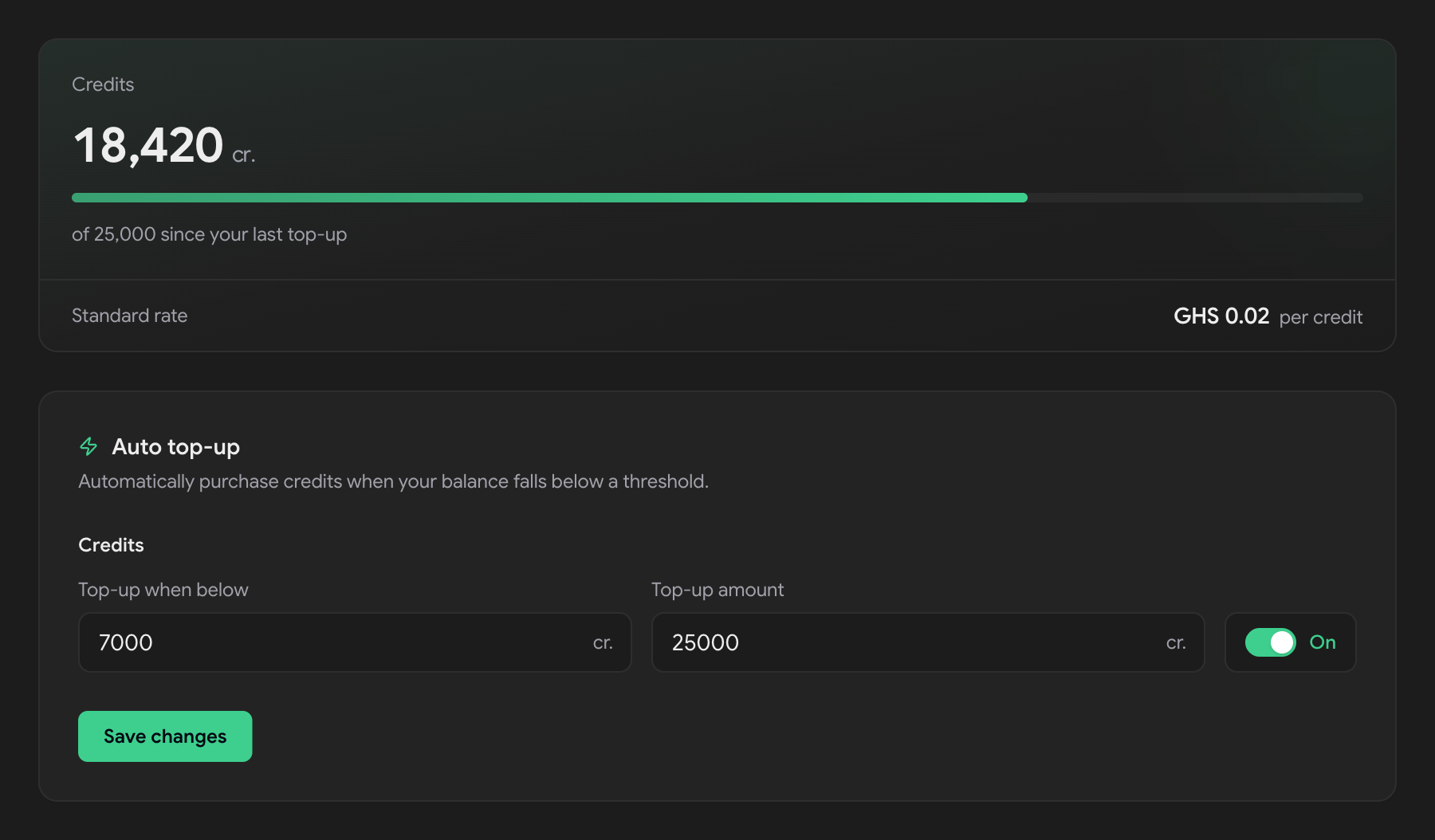
One thing that trips people up: the card lives on your account, but the rules live on the project. So your production project and your staging project can share one card and carry completely different thresholds. Which is usually exactly what you want.
How to pick your threshold — this is the part people get wrong
The instinct is to set the threshold as low as possible, because why hold money in credits you haven't spent yet. Makes sense. It's also the one setting that'll bite you.
First, what actually happens when a send outruns your balance — because it's better than you'd guess, and it changes what the threshold is for.
Say you're running a 500-credit threshold and you fire a campaign at 8,000 contacts. Sailup sends what the balance covers, and parks every remaining recipient in pending_balance instead of dropping them. The top-up fires, the credits land, the parked messages go out on their own. Nothing is lost.
So the threshold isn't protecting you from losing messages. It's protecting you from waiting. Every message in pending_balance is a message sitting behind a card charge, and what that costs you depends entirely on what you're sending. A newsletter genuinely does not care. An OTP — where the whole value is showing up in the ten seconds somebody is staring at a login screen — cares enormously.
Hence the rule of thumb: size the threshold to your largest single send, plus a day of normal traffic, and lean high if your traffic is transactional. Then the balance is never sitting somewhere your next send has to queue behind.
Worth knowing that all of that is with a rule switched on. With no auto top-up at all, a batch your balance can't cover doesn't partially send — the request is rejected with insufficient_balance and nothing goes out. That's the real before-and-after here.
The top-up amount is a different question, and honestly it's about how often you want your card touched. Size it at a few weeks of sending and you get a handful of charges a year and a payment history you can actually read. Size it at two days of sending and you're getting charged every couple of days, which is just noise in your bank feed.
| Sending pattern | Threshold | Top-up amount | Charge at ₵0.02 |
|---|---|---|---|
| OTPs only, ~200/day, no campaigns | 1,000 | 5,000 | ₵100 |
| ~1,000/day transactional, 5,000-contact monthly campaign | 7,000 | 25,000 | ₵500 |
| ~10,000/day mixed traffic | 25,000 | 100,000 | ₵2,000 |
The floors are 50 credits on the threshold and 100 on the top-up amount, which anything sensible clears easily — so start somewhere reasonable and tune it once your traffic has a shape you recognise.
So what actually happens when auto top-up fires?
Balance crosses your threshold. Card gets charged for the top-up amount at your unit price. Credits land. Sending continues. You find out later, which is the entire point.
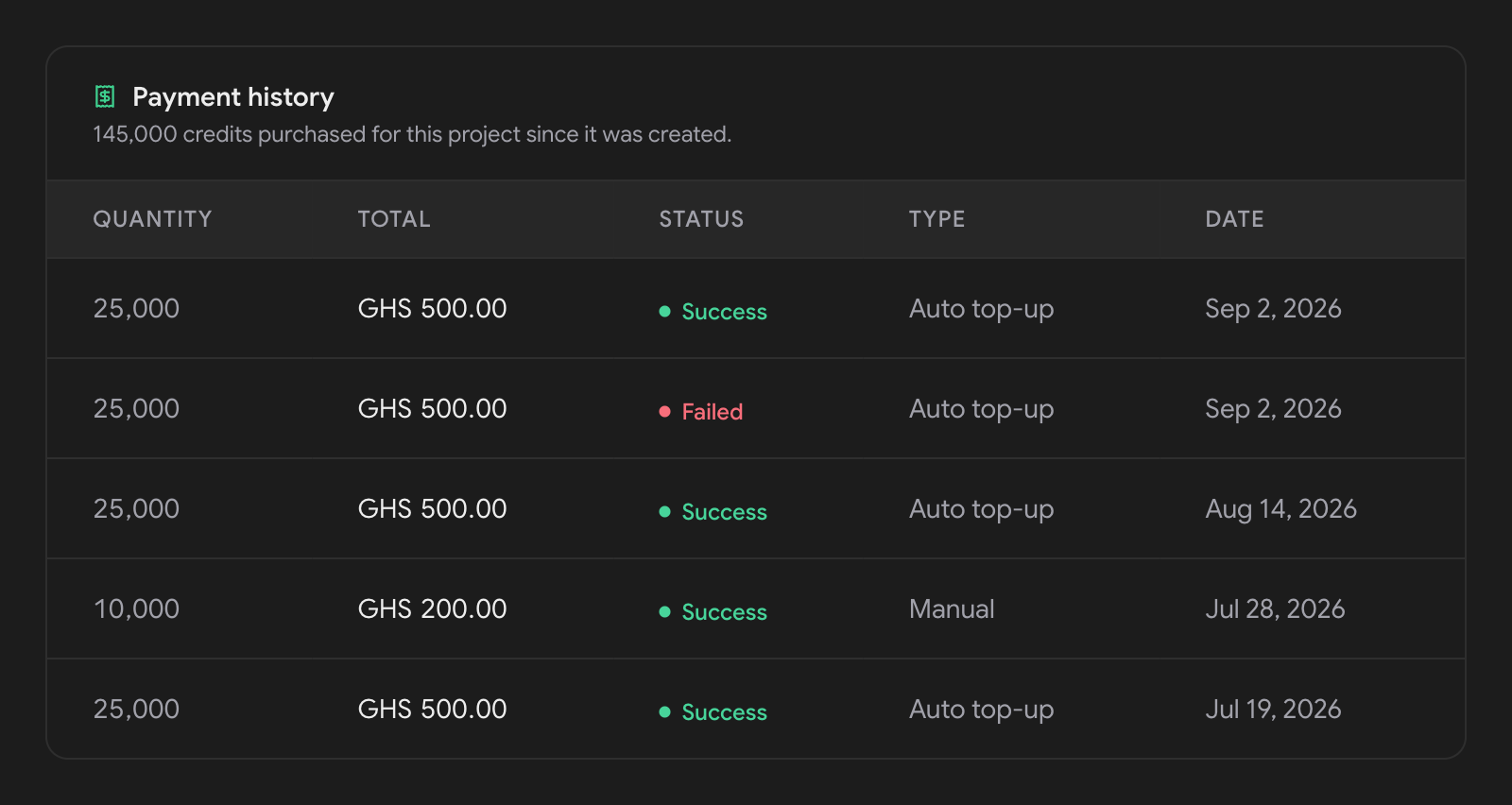
Later looks like Usage → Payment history, where every row is tagged Auto top-up or Manual next to its amount and status. That column is your audit trail, and if you're reconciling a card statement against sending volume it's the only thing you need.
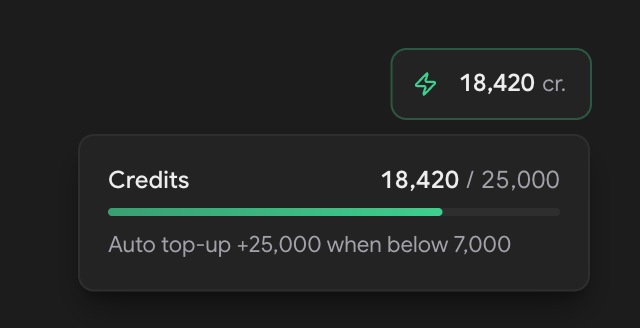
The credit pill up in the dashboard header carries the live state too. Hover it and you get the rule in a single line, or Auto top-up off when nothing's running. The balance goes red once you're at or below your threshold — which, with the rule switched on, should be a moment rather than a state. Switch the rule off and the gauge falls back to warning you under 20% of your last top-up, since there's no line of your own left to measure against.
What happens when the card payment fails?
Auto top-up doesn't remove the failure. It moves it. And the honest version of this post says where it moved to.
Cards expire. Banks decline. Accounts run dry.
When the charge doesn't go through, the credits don't arrive, and everything your balance can't cover keeps stacking up in pending_balance instead of sending.
And here's the bit to plan around: that failure isn't reliably visible to you. Usually the attempt leaves a failed row in payment history, tagged Auto top-up, which is exactly what you'd want. But when the charge never gets far enough to create a payment — a processor error rather than a declined card — there's no row to find. The detailed attempt log, with the reason attached, currently sits on our side rather than yours.
So the signal to trust is the balance itself. The credit pill goes red at your threshold and stays red, because the top-up that should have cleared it never landed. Red that hasn't resolved itself in a few minutes means the charge failed. From there it's worth checking the card on the Payment method tab — the expiry is printed right on the card face — or asking us, since we can see which reason came back.
What auto top-up isn't
It isn't a subscription. Nothing recurring, nothing to cancel. The card only gets touched when your own sending pulls the balance down, and Sailup credits never expire, so a top-up isn't a spend-it-or-lose-it clock.
It isn't a spending cap. It's the opposite of one — it's a standing authorisation to charge. A retry loop that fires the same OTP forty thousand times will drain your balance, trigger a top-up, and drain that too. So size the top-up amount at the biggest charge you're comfortable seeing without being asked first, and glance at payment history whenever your traffic changes shape.
Turning it off keeps your settings. Flip the toggle and your threshold and amount stay saved, ready to switch back on before a campaign. Pulling the card off the account stops everything.
So should you turn auto top-up on?
If you send anything transactional — OTPs, receipts, delivery alerts, password resets — yes, and it's not close. Those are messages where the whole value is that they arrive within seconds of somebody expecting them, and "we ran out of credits over the weekend" is a rough thing to explain to a user who couldn't log in.
If you only run occasional campaigns and you top up deliberately before each one, you can skip it — you already have a human in the loop, which is the thing this replaces. Just know the cost of misjudging it: with no rule running, a send your balance can't cover is rejected outright rather than partially delivered.
For everyone else: add a card, pick two numbers, get back to shipping. If you're still sizing up providers, the pricing page has the flat rate in full, and the API documentation covers everything you'd actually send once the credits are there.
Frequently asked questions
What is auto top-up on Sailup?
Auto top-up is a rule on your Sailup project that buys SMS credits automatically. You set a threshold and a top-up amount, both in credits, and save a card. When your balance falls below the threshold, Sailup charges the card for the top-up amount and the credits land on the project. There is no subscription and nothing recurring.
What happens if my SMS credits run out mid-send?
With auto top-up enabled, Sailup sends to every recipient your balance covers and holds the rest in a pending_balance state. Once the top-up lands, those held messages send themselves, so nothing is lost. With no auto top-up rule, a batch your balance cannot cover is rejected outright with an insufficient_balance error and nothing is sent.
Is there a minimum auto top-up amount?
Yes. The threshold must be at least 50 credits and the top-up amount at least 100 credits. At the standard rate of ₵0.02 per credit, a 100-credit top-up is a ₵2 charge, so the floors are low enough that any realistic setting clears them.
What happens if the card is declined?
The credits do not arrive and your balance keeps falling, so anything it cannot cover waits in pending_balance instead of sending. Most failed attempts leave a failed row in your payment history, but a processor-level error can fail before a payment record exists. The reliable signal is the credit balance staying red past your threshold.
Can different projects have different auto top-up settings?
Yes. The card is stored once on your Sailup account, but auto top-up rules are stored per project, so production and staging can share a card and still carry completely different thresholds and top-up amounts. Each project also keeps its own credit balance.
Send your first SMS in five minutes.
No setup fees, no contracts — pay only for what you send, and volume discounts when you scale.